Narrate reads any page aloud.
A free Chrome extension that reads any web page — or just your selection — with your computer's own voices, highlighting each word as it is spoken. No account, no API key, and zero network requests: nothing you read ever leaves your machine.
Follow along as it speaks.
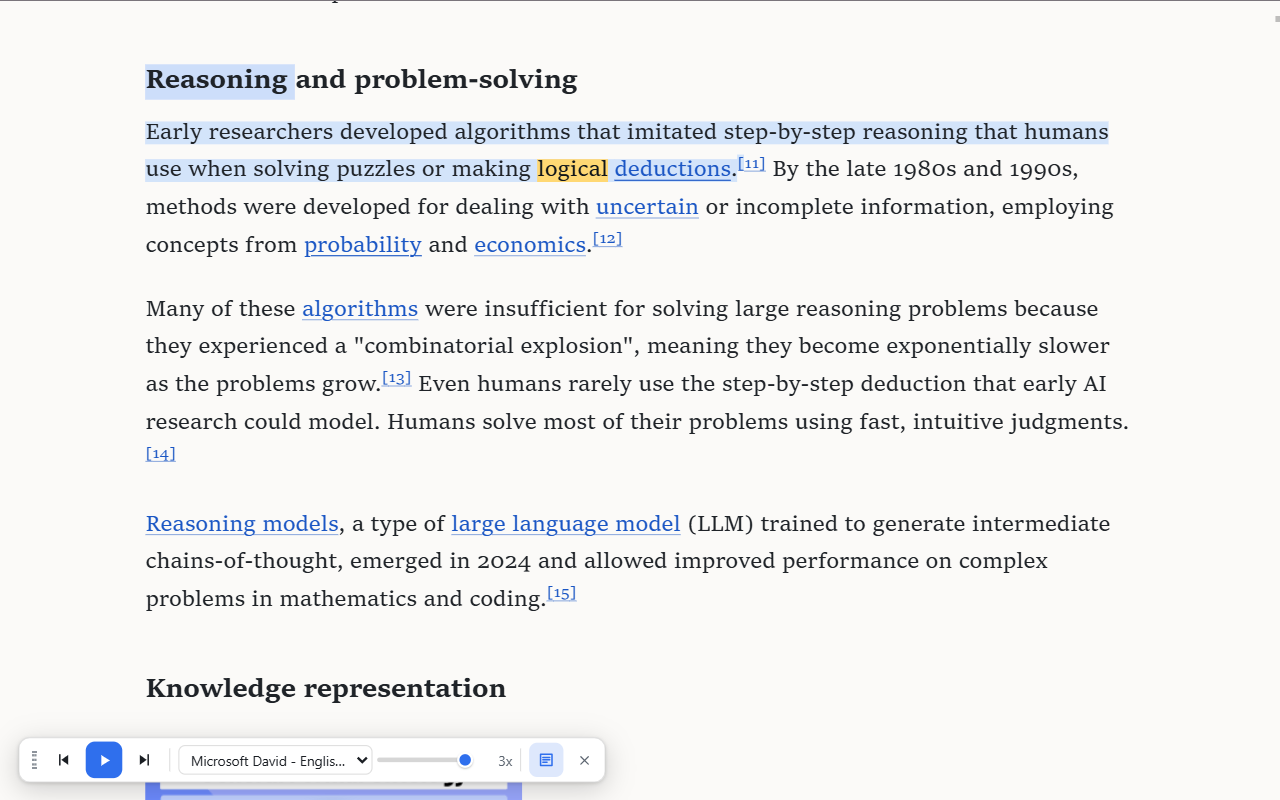
Narrate reading a live article — current word in amber, current sentence tinted, toolbar docked at the bottom.
What it does.
Reads any page.
Articles, docs, dashboards, web apps — not just article-shaped pages.
Highlights every word.
The spoken word and its sentence are highlighted, and the page auto-scrolls to follow along.
Jump anywhere.
Double-click any spot on the page to continue reading from that sentence.
Read a selection.
Select text, right-click, "Read selection aloud". Or press Ctrl+Shift+U to start and stop.
Built-in reader view.
Strip a cluttered page down to clean typography and listen there.
Make it yours.
Per-site voice and speed preferences, and a highlight colour you choose, on the options page.
Zero network requests. Verified, not promised.
Narrate is built by a security consultancy, and it shows: the extension has no analytics, no telemetry, no accounts, and no backend. Page text goes only to the browser's own on-device speech engine, and your preferences stay in your own Chrome profile. We verified the zero-network claim empirically — with both a static code sweep and a runtime probe — before shipping.
Questions or problems?
Email info@llabtechnologies.com with "Narrate" in the subject line, or use the contact form. We read everything.